Checkout with Confidence
Payment Security Guaranteed
Return with Ease
Fast & Hassle-Free Process
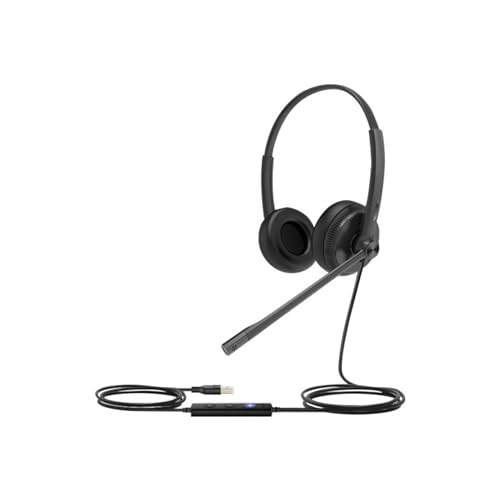
This product — Yealink UH34 Lite Professional USB-A, Plug & Play Binaural Corded Headset with Noise Cancelling Microphone, In-line Controller and Soft Foam Ear Cushions (Optimised for Microsoft Teams) – Black
Refer to the product listing for full specifications and care instructions. Check compatibility before purchase.
Yealink UH34 Lite USB-A Binaural Headset with Noise Cancelling Mic - Black
Key Takeaway
Experience crystal-clear audio and seamless communication with this professional USB-A corded headset, designed for comfort and efficiency at just 28.90. Featuring a noise-cancelling microphone and soft foam ear cushions, it's perfect for remote workers and professionals who rely on Microsoft Teams for meetings. Enjoy the convenience of plug-and-play functionality and an in-line controller for easy adjustments during calls.
Frequently Asked Questions
What is Yealink UH34 Lite Professional USB-A Headset?
The Yealink UH34 Lite is a professional USB-A binaural corded headset designed for clear communication. It features a noise-cancelling microphone and is optimized for Microsoft Teams, making it ideal for remote work and online meetings.
How much does Yealink UH34 Lite cost?
The Yealink UH34 Lite is priced at $28.90, offering excellent value for a professional headset. Its features, such as noise cancellation and comfort, make it a cost-effective choice for professionals.
What are the key features of Yealink UH34 Lite?
Key features of the Yealink UH34 Lite include a noise-cancelling microphone, in-line controller for easy adjustments, and soft foam ear cushions for comfort during long use. It is also plug and play, ensuring quick setup.
Who is Yealink UH34 Lite best for?
The Yealink UH34 Lite is best suited for remote workers, business professionals, and anyone using Microsoft Teams for communication. Its design and features cater to those who need reliable audio quality in a professional setting.
How do I use/care for Yealink UH34 Lite?
To use the Yealink UH34 Lite, simply connect it to your device via the USB-A port and adjust the in-line controller as needed. For care, keep the headset clean by wiping it with a soft cloth and store it in a cool, dry place when not in use.
Fast Delivery
Quick & reliable shipping
Secure Shopping
100% secure transactions
Great Prices
Competitive deals daily
Expert Support
Here to help you choose
More Products You Might Like from binauralaudio
View All



Please Note: When you order through these links, we may earn a commission at no additional cost to you.