Checkout on Amazon
Payment is handled by Amazon
Check return terms
Amazon or seller terms apply
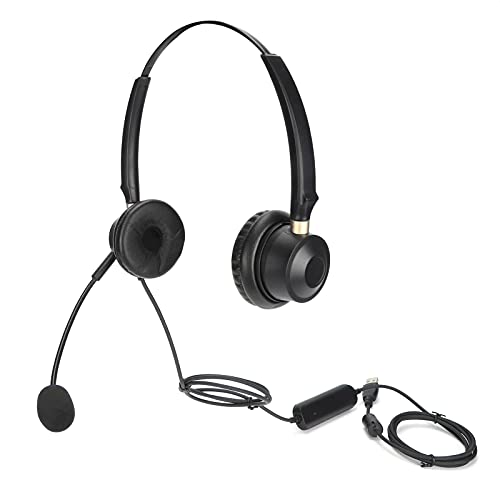
This product — Yealink UH35 Binaural USB-A/C Headset, optimized for Teams
Refer to the product listing for full specifications and care instructions. Check compatibility before purchase.
Yealink UH35 Dual Ear USB-A/C Headset for Microsoft Teams
- 1Open AmazonView the live listing
- 2Check the priceConfirm price and delivery
- 3Complete checkoutFinish your order on Amazon
Price and availability may change on Amazon.
Key Takeaway
Experience crystal-clear audio and seamless communication with this Yealink UH35 Binaural USB-A/C Headset, designed specifically for Microsoft Teams. Priced at just Check price on Amazon, this headset is perfect for remote workers and professionals who need reliable sound quality for calls and video conferences. Enjoy comfort and clarity all day long, making your work-from-home setup more efficient and enjoyable.
Frequently Asked Questions
What is Yealink UH35 Binaural USB-A/C Headset?
The Yealink UH35 Binaural USB-A/C Headset is a professional-grade headset designed for clear communication and comfort. It is optimized for Microsoft Teams, making it ideal for remote work and virtual meetings.
How much does Yealink UH35 Binaural USB-A/C Headset cost?
The Yealink UH35 headset is priced at Check price on Amazon. This competitive price offers excellent value for a high-quality headset designed for productivity and comfort.
What are the key features of Yealink UH35 Binaural USB-A/C Headset?
Key features of the Yealink UH35 include dual speakers for immersive sound, a noise-canceling microphone for clear calls, and USB-A/C connectivity for versatile use. It also boasts a comfortable design for extended wear.
Who is Yealink UH35 Binaural USB-A/C Headset best for?
The Yealink UH35 is best suited for remote workers, business professionals, and anyone using Microsoft Teams for communication. Its features cater to those who require clear audio and comfort during long calls.
How do I use/care for Yealink UH35 Binaural USB-A/C Headset?
To use the Yealink UH35, simply connect it to your device via the USB-A or USB-C port. For care, keep the headset clean and store it in a dry place to maintain its longevity and performance.
Check Delivery
Confirm the estimate on Amazon
Amazon Checkout
Payment is handled by Amazon
Check Return Terms
Amazon or seller terms apply
Amazon Support
Use Amazon for order help